
It finds the product for you
Open any product or listing page — the badge appears with the item name already detected. No copying titles or URLs by hand.
Real rates in one hover
Enter two ZIP codes and get live carrier prices with delivery days. SMKlog estimates the box size and weight for you.
Checkout stays on SMKlog
The extension never touches payment. Labels, tracking, protection, pickup, and returns live on the SMKlog site.
From “found it” to “shipped it” in three steps.
Open a product or listing page
A shop, eBay, a Craigslist-style classified, a marketplace, or a for-sale forum thread — the badge shows up where there is something to ship.
Hover the badge
The item name is prefilled. On local classifieds the seller’s ZIP from the ad is picked up automatically. Add the destination ZIP and hit “Get shipping rates”.
Continue on SMKlog
One click carries the item, route, and package estimate into the full calculator for checkout. Restricted items are checked before payment, and pallet or freight shipments are not sold.

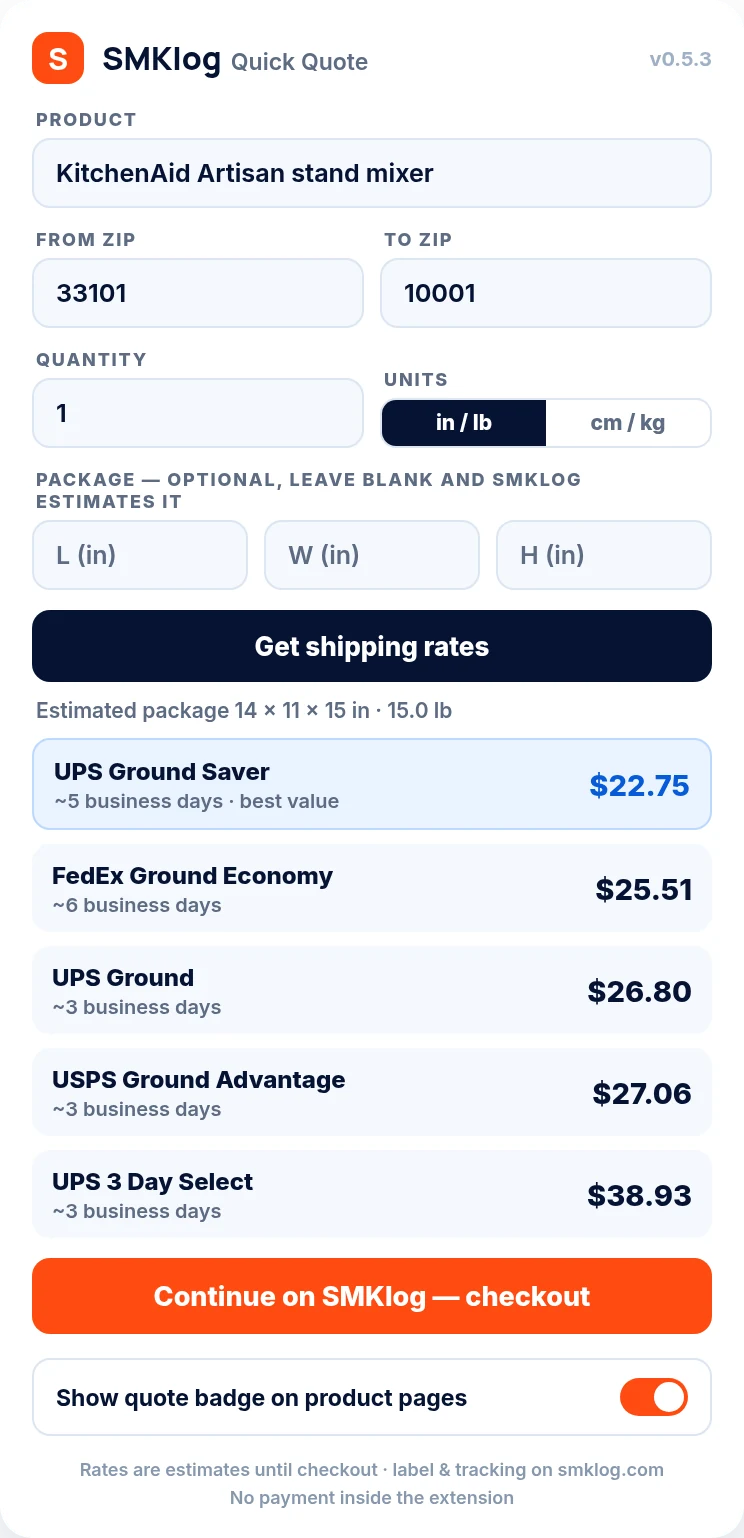
A real quote, taken the way the badge takes it
On 2026-07-27 we opened a used console listing, hovered the badge, and added a destination ZIP. Nothing was measured, weighed, or typed beyond the two ZIP codes — the item name came off the page and the box came from the estimate.
What the badge read
Sony PlayStation 5 Slim console with controller, used, no original box
Brand, model, and condition all matter. “No original box” changes the packed size, and the estimate uses it.
Box it worked out
18 × 12 × 8 in
45 × 30 × 20 cm
Packed weight 10 lb (4.5 kg), padding and carton included.
Route
Brooklyn, NY 11201
to Austin, TX 78701
On a classified ad the seller ZIP is picked up from the listing, so usually you only type the destination.
| Carrier | Service | Price | Estimated transit | Post Office counter |
|---|---|---|---|---|
| USPS | Ground Advantage | $22.18 | 6 business days | $33.30 |
| UPS | Ground | $22.99 | 3 business days | — |
| FedEx | Ground | $35.03 | 4 business days | $36.52 |
Prices are what you pay at checkout — label plus SMKlog’s charge, nothing added later. The counter column is the published USPS retail price for the same parcel and lane, which is what the same box costs handed over at a Post Office window. Carriers reprice constantly and every route is different, so treat this as a worked example rather than a price list.
What it picks up, site by site
The badge is not a generic “quote” button. What it can fill in for you depends on what the page actually publishes.
eBay
The listing title and the seller’s city. From the city it works out the origin ZIP and fills the “from” field, so a buyer checking postage before bidding only supplies their own ZIP.
Craigslist and classifieds
Item title plus the posting’s location. These are the pages where shipping is negotiated in messages, and where a wrong guess costs the seller the margin on the sale.
Shops and marketplaces
Amazon, Target, Home Depot, Facebook Marketplace, Swappa and hundreds of ordinary storefronts: the product name and any size or weight the page states are read straight off the page.
Forums and for-sale threads
Reddit for-sale threads, XenForo boards, Bring a Trailer. There is no structured product data on these pages at all, so the badge works from the thread title and the post text.
When the page says nothing useful
The popup takes over: type the item, set quantity and units, or override the box entirely if you have already packed it and measured the carton.
What it never reads
Pages with nothing to ship. The badge only appears where an item is detected, and it sends nothing anywhere until you ask for rates.
Installing and removing it
Install
Open the Chrome Web Store listing, click Add to Chrome, then Add extension in the confirmation box. It is live immediately — no account, no email, no card. Pin it from the puzzle-piece icon in the toolbar if you want the popup one click away.
Which browsers
Chrome on Windows, macOS, Linux and ChromeOS. It also installs on Chromium browsers that accept Web Store extensions, including Edge, Brave, Opera and Vivaldi. There is no Safari or Firefox build.
Remove
Right-click the icon and choose Remove from Chrome, or open chrome://extensions and click Remove. Nothing is left behind and there is no subscription to cancel, because there was never one to start.
Permissions, in plain words
It needs to read the page you are looking at to find the item. That is the whole reason for the site access permission. It does not read pages you are not on, does not collect browsing history, and does not store your ZIP codes.
What it deliberately does not do
Worth stating plainly, because these are the things people assume a shipping extension does.
It takes no payment
No card fields, no wallet, no checkout inside the extension. Buying a label happens on the SMKlog site, where the order, the tracking and the protection option live.
It does not buy for you automatically
Nothing is purchased, bid on, or committed to. The badge quotes; every step after that is a click you make yourself.
It cannot weigh your parcel
The box and weight are an estimate from the item description. It is close enough to choose a service and set a price with a buyer — but carriers reweigh parcels in their own network, so when the box is packed, use the real numbers.
Oversized and restricted goods get no instant price
Anything past parcel limits is freight, which SMKlog does not arrange, and anything a carrier restricts is stopped before payment. That is on purpose: an instant price on a shipment that cannot legally move as a parcel is worth nothing.
Common questions
Is the extension free?
Yes, and there is nothing to sign up for. You pay only when you buy a label on the SMKlog site, and that price is shown in full before you pay.
Do I need an account?
No. The badge quotes without one, and a label can be bought without one too.
How does it know the weight if I have not weighed anything?
It estimates the packed box and weight from the item on the page — brand, model and condition all move the answer. Once you have packed the parcel, put the real measurements in; a low declared weight is what carriers bill back later.
Which carriers does it show?
USPS, UPS and FedEx side by side with delivery estimates, so you can see what speed actually costs on your route rather than assuming one carrier is always cheapest.
Does it work on eBay before I bid?
Yes, and that is one of its better uses. The seller’s city gives the origin, so you can see real postage on a listing before deciding what it is worth to you.
What data does it send?
Only the item and the two ZIP codes, and only at the moment you ask for rates. No browsing history, no page contents beyond the detected item, nothing sold on. The extension privacy terms spell it out.
Get the extension
SMKlog Quick Quote is free and live on the Chrome Web Store. One click adds it to Chrome — no sign-up, no payment details, and you can remove it anytime from your browser.
Private by design
The extension reads the page you are on only to detect the item you want to ship. It never collects browsing history, never stores your ZIP codes, and never sells data. Quotes are sent to SMKlog only when you ask for them.
Extension privacy & terms